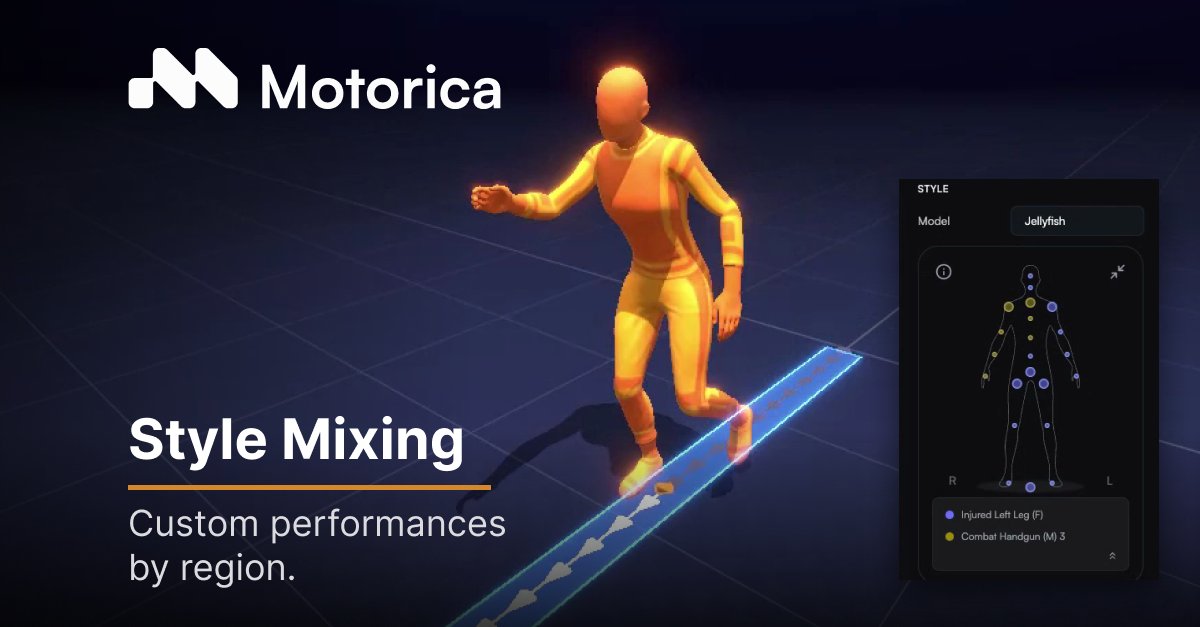
Style Mixing is our latest Feature Drop. It lets you apply different motion styles to different body regions in Motion Stage and generate one take — without retraining from scratch.
Animators keep control when a character has to do more than one thing at once. Studios iterate when gameplay states change. Players get acting that matches the state on screen.
Tim, Head of Product, walks through it in the Feature Drop.
Open the Feature Drop on YouTube.
What product this lives in
Style Mixing is a capability inside Motion Stage, Motorica's product for generating single-take locomotion animations.
Motion Stage sits in Motorica's animation authoring platform with Motion Factory (batch locomotion datasets for motion matching) and Style Cloning (custom Styles from studio mocap). Style Mixing extends the Styles system inside Motion Stage. It does not replace Motion Stage, and it is not a Motion Factory or Style Cloning feature of its own — it is how you use Styles when you are authoring a clip in Motion Stage.
What Style Mixing is
A Style in Motorica shapes how generated motion performs. Style Mixing lets you assign different motion Styles to different regions of a character's body, then generate a single animation.
One global Style is not the only option. You can direct performance region by region. In this Feature Drop, Tim uses an injured gait on the legs and a weapon-ready Style on the upper body, in one take.
That is regional motion-style control: gait, weapon handling, stance. It is not mixing emotions across body parts.
How Style Mixing works
In Motion Stage, Styles define how generated motion performs. They are trained from real mocap data. Root motion — where the character goes — stays on the Motion controls. Styles shape how the performance reads.
Style Mixing adds regional control on top of that:
- Choose a Style for a body region (for example, lower body).
- Assign other Styles to other regions (for example, torso and arms).
- Adjust how strongly each region follows its Style.
- Generate — Motion Stage synthesizes one clip from those regional inputs.
You do not retrain the model to combine those Styles.
How Style Mixing relates to Styles and Motion Stage
Styles are the performance layer. They shape how motion reads without changing root motion pathing.
Motion Stage is where you author a single-take clip using Styles, motion presets, and export.
Style Mixing sits on both: it is how multiple Styles combine inside one Motion Stage generation.
A global mix is one blend across the whole character. Style Mixing is regional — different body regions can use different Styles in the same take.
Motorica previously called this Style Blending. The product name is now Style Mixing.
Recommended reading